How to convert RTF to HTML email with embedded images and send it via SmtpClient in .NET C#
In this article you will find how to create a simple .NET/C# application which converts RTF document to HTML email with embedded images and sends it using MS Outlook programmatically.
Let’s make a C# code satisfying of these conditions:
- Acceptable for any .NET application: ASP.NET, Windows Forms, WPF, Console, Web Service, SilverLight etc.
- Works at 32-bit and 64-bit Windows machines.
- Compatible with .NET 2.0, 3.5 , 4.0, 4.5 frameworks and even higher if such will appear.
To make converting of RTF to HTML email with images at server-side we’ll use RTF-to-HTML DLL .Net library. It’s .Net component which will provides API to convert RTF to HTML with all images which we’ll get in a list after converting. We need these images extracted from RTF to further adding them into email as attachments.
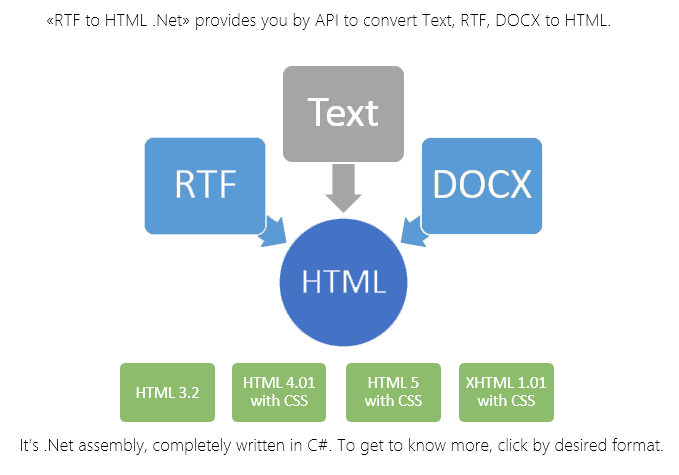
To get the ball rolling, download the RTF-to-HTML DLL .Net component from here: Скачать.
To check this out first hand, unpack the archive and create a new C# Console Application named SmtpRtfToHtml. Next add reference to the “SautinSoft.RtfToHtml.dll” as shown on picture below:
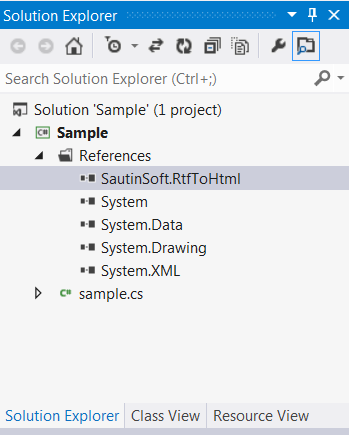
How to add a reference to SautinSoft.RtfToHtml.dll
This is C# code of our application:
           using System;

using System;
using System.IO;
using System.Net;
using System.Net.Mail;
using System.Drawing;
using System.Collections;

namespace Sample
{
    class Program
    {
        static void Main(string[] args)
        {
            string pathToRtf = @"c:\Document.rtf";

            // 1. Convert RTF to HTML and place all images to list
            string rtf = File.ReadAllText(pathToRtf);
            SautinSoft.RtfToHtml r = new SautinSoft.RtfToHtml();
            r.ImageStyle.IncludeImageInHtml = false;
            ArrayList imageList = new ArrayList();

            // 2. After launching this method we'll get our RTF document in HTML format
            // and list of all images.
            string html = r.ConvertString(rtf, imageList);

            // 3. Create HTML email
            string from = "bob@bobsite.com";
            string to = "john@johnsite.com";
            string subject = "This is a testing email from Bob to John using SmtpClient";

            MailMessage emailMessage = new MailMessage();
            emailMessage.From = new MailAddress(from);
            emailMessage.To.Add(to);
            emailMessage.Subject = subject.Replace("\r\n", "");

            // 4. Attach images to email
            System.Net.Mail.AlternateView altView = AlternateView.CreateAlternateViewFromString(html, null, "text/html");

            foreach (SautinSoft.RtfToHtml.SautinImage simg in imageList)
            {
                if (simg.Img != null)
                {
                    LinkedResource lr = null;
                    System.IO.MemoryStream ms = new System.IO.MemoryStream();
                    simg.Img.Save(ms, System.Drawing.Imaging.ImageFormat.Png);
                    if (ms != null && ms.Position > 0)
                        ms.Position = 0;
                    lr = new LinkedResource(ms);
                    lr.ContentId = simg.Cid.Replace("cid:", "");
                    altView.LinkedResources.Add(lr);
                }
            }
            emailMessage.AlternateViews.Add(altView);

            // 5. Send the message using email account
            string userName = "bobuser";
            string userPassword = "bobpassword";

            SmtpClient client = new SmtpClient();
            client.Port = 25;
            client.DeliveryMethod = SmtpDeliveryMethod.Network;

            //client.UseDefaultCredentials = false;

            // Some smtp servers doesn't require credentials, therefore
            // you may set: client.UseDefaultCredentials = false;
            // and remove the line: client.Credentials = new NetworkCredential(userName, userPassword);

            client.Credentials = new NetworkCredential(userName, userPassword);
            client.Host = "smtpout.bobsite.com";
            client.Send(emailMessage);

        }
    }
}
Если вам нужен пример кода или у вас есть вопрос: напишите нам по адресу support@sautinsoft.ru или спросите в онлайн-чате (правый нижний угол этой страницы) или используйте форму ниже: